For many small and medium businesses, the most expensive leads are not the ones that never show up. They are the ones that called, asked for help, wanted an appointment, or requested pricing — and then disappeared because no one responded quickly enough.
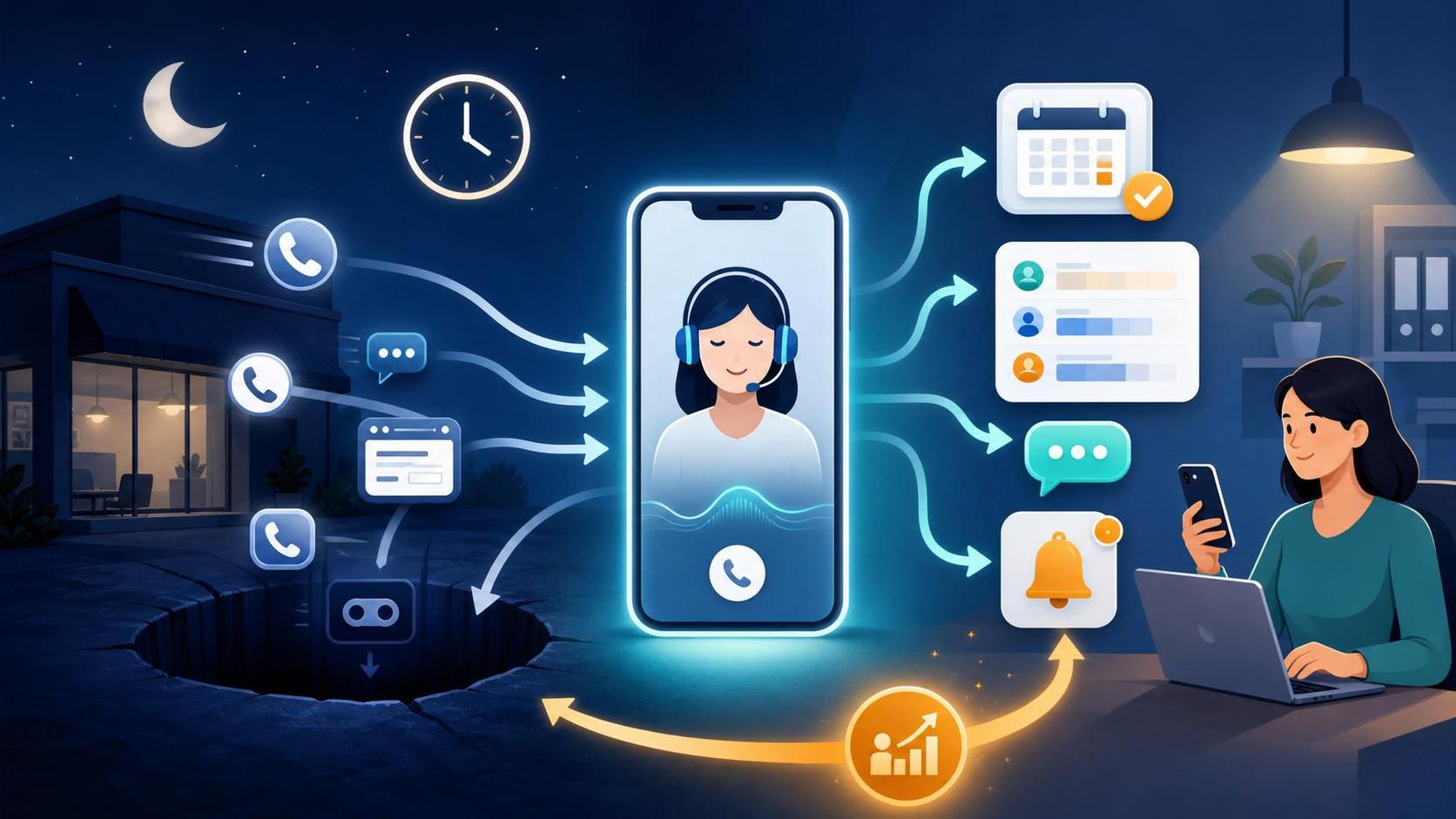
After-hours calls, weekend inquiries, lunch-break voicemails, busy phone lines, and delayed callbacks all create the same problem: lead leakage. An AI receptionist can help close that gap by answering immediately, collecting the right information, qualifying the opportunity, and helping the customer take the next step when your staff is unavailable.
Introduction to AI Receptionists
An AI receptionist is an AI-powered phone or messaging assistant that can greet customers, answer common questions, capture contact details, qualify inquiries, route requests, and book appointments based on your business rules.
You may also hear it called an AI answering service, virtual receptionist, automated receptionist, digital receptionist, AI phone agent, or AI call assistant. The names vary, but the business purpose is the same: help your company respond faster and more consistently when a human team member is not available.
It is not the same as voicemail. Voicemail waits for the customer to leave a message. An AI receptionist engages the customer in real time.
It is also different from a traditional answering service. A traditional service usually relies on human agents reading scripts. An AI receptionist can combine conversation, intake workflows, scheduling rules, CRM updates, and automated follow-up.
And while it may overlap with chatbots, an AI receptionist is especially useful for phone-based businesses where calls still drive appointments, consultations, estimates, and sales conversations.
The After-Hours Answering Problem
Small businesses often lose revenue because they are built around business-hour coverage, while customers behave on their own schedule.
A prospect may call after work. A homeowner may request an estimate on Saturday. A patient may try to schedule during lunch. A legal client may leave a message after an urgent event. A buyer may contact three providers and choose the one that responds first.
When those moments go to voicemail or delayed follow-up, the business may never know how much revenue was lost.
Common leakage points include:
- Calls after hours, on weekends, or during holidays
- Missed calls when staff are busy with in-person customers
- Slow follow-up from web forms, chats, or appointment requests
- Inconsistent qualification by different team members
- Manual scheduling delays that cause prospects to move on
The issue is not just customer service. It is revenue capture.
Why This Happens
Most small businesses do not miss calls because they do not care. They miss calls because their team is already stretched.
Front-desk staff may be answering phones, greeting customers, handling paperwork, confirming appointments, and managing internal requests. Sales teams may be in meetings or on job sites. Owners may be working in the business rather than monitoring every lead channel.
After hours, the gap becomes even larger. Voicemail may technically receive the message, but it does not answer questions, qualify the caller, schedule an appointment, or reassure the prospect that someone is taking action.
An AI receptionist helps by creating a consistent front door for calls and inquiries when your team is unavailable, overloaded, or focused on higher-value work.
Business Impact of an AI Receptionist
Missed calls and delayed responses affect more than the phone log. They can reduce booked appointments, increase no-shows, slow down sales cycles, and create a poor first impression.
The business impact usually shows up in four areas:
- Lost opportunities
Qualified prospects contact a competitor before your team responds.
- Lower conversion rates
The longer the delay, the colder the lead becomes.
- Operational friction
Staff spend time chasing incomplete voicemails or unclear messages.
- Inconsistent customer experience
Some callers receive excellent help while others get no immediate response.
The value of an AI receptionist depends on your economics. If your average customer value is high, recovering even a small number of missed opportunities each month may justify the system.
A simple ROI framework looks like this:
| Input | Example |
|---|---|
| Recovered qualified leads per month | 10 |
| Close rate | 30% |
| Average customer value | $1,000 |
| Estimated recovered revenue | $3,000 |
This is not a guarantee. It is a planning model. The real number depends on your call volume, lead quality, margins, and sales process.
Book a Free Revenue Recovery Consultation
Customer Psychology
Customers often reach out when their need is active. They may be comparing providers, trying to solve a problem quickly, or looking for reassurance before making a decision.
When they reach voicemail, it can feel like a dead end. Even if they leave a message, they may keep searching. If another business answers immediately, asks the right questions, and offers a clear next step, that business often has the advantage.
This is especially true for appointment-based and service businesses such as home services, healthcare offices, legal firms, real estate teams, automotive shops, fitness studios, and professional services.
The customer is not always looking for a perfect answer. Often, they simply want to know:
- Can you help me?
- Are you available?
- What happens next?
- How soon can I speak with someone or book a time?
An AI receptionist can provide that immediate response without requiring your team to be available 24/7.
Real World Example
Imagine a local service business that receives calls for estimates during the day, after work, and on weekends.
Before using an AI receptionist, after-hours callers hear voicemail. Some leave messages with incomplete details. Others hang up. The office manager calls back the next morning, but several prospects have already booked with competitors.
With an AI receptionist, the after-hours flow changes:
- The caller reaches the business number.
- The AI answers immediately and asks how it can help.
- It identifies whether the caller needs a new estimate, an existing appointment update, or general information.
- It asks approved intake questions such as location, service needed, urgency, and preferred appointment time.
- It provides approved answers about service areas, business hours, and next steps.
- It books an available appointment or sends the request to a human for review.
- It logs the interaction and alerts the team.
The business does not need the AI to close the sale. It needs the AI to keep the opportunity alive until the team can act.
Common Mistakes
The biggest mistake is treating missed calls as an administrative nuisance instead of a revenue leak.
Other common mistakes include:
- Relying on voicemail as the primary after-hours process
Voicemail captures messages, but it does not qualify, schedule, or guide the customer.
- Adding automation without defining the workflow
AI needs clear business rules, approved answers, escalation paths, and booking logic.
- Letting the AI overpromise
The system should not guarantee pricing, availability, outcomes, or emergency response unless you have approved those statements.
- Skipping human handoff rules
Urgent, sensitive, unusual, or high-value situations should transfer, notify, or escalate to a person.
- Failing to monitor performance
Call transcripts, booking outcomes, and lead quality should be reviewed and improved over time.
AI Receptionist Solutions
Better processes
Start by understanding what happens today.
Map the full path from inquiry to follow-up:
- Which calls are missed?
- When do they happen?
- What details are usually needed?
- Who follows up?
- How quickly does the team respond?
Then define what a successful call outcome looks like. For some businesses, the goal is to book an appointment. For others, it is to qualify the prospect, capture details, and route the request to the right person.
Better systems
Your receptionist workflow should connect to the systems your business already uses.
The most important integrations are usually:
- Phone system
- CRM or lead database
- Appointment calendar
- Email and SMS follow-up
- Reporting dashboard
Without these connections, your AI receptionist may answer calls but still leave your team with manual data entry and disconnected follow-up.
Automation
Basic automation can help with confirmations, reminders, missed-call texts, form notifications, and routing rules.
For example, if someone requests an appointment, the system can send a confirmation message. If a lead is marked urgent, it can notify the right person. If a caller asks for a callback, it can create a task in your CRM.
Automation is most useful when it supports a clear process rather than replacing judgment.
AI
AI adds the ability to hold a more natural conversation, understand caller intent, ask follow-up questions, and adapt within the limits you set.
An AI receptionist can typically help with:
- 24/7 answering and after-hours coverage
- Lead intake and qualification
- Common customer questions
- Appointment booking or appointment requests
- CRM updates and team alerts
The strongest results come when AI is combined with structured workflows, not when it is left to “figure things out” on its own.
AI Opportunity for After-Hours Answering
An AI receptionist works best when it is designed around the moments your team cannot consistently cover.
That includes after hours, weekends, holidays, lunch breaks, high-volume periods, staff shortages, and times when multiple calls arrive at once.
Lead qualification is one of the most valuable use cases. The AI can ask the same questions your best staff already ask, such as:
- What service do you need?
- Where are you located?
- How urgent is the issue?
- Are you a new or returning customer?
- What appointment times work best?
For scheduling, the system should follow your rules. It should know available time slots, appointment types, service areas, buffer times, and when a request should be reviewed by a human before booking.
For FAQs, it should only answer from approved business information: hours, locations, services, pricing ranges, emergency policies, preparation steps, and next steps.
Good AI receptionist design is not about replacing good employees. It is about protecting the moments when good employees are unavailable.
Quick Wins
Before you evaluate tools, document the calls you already receive.
Start with these steps:
- List the top five reasons people call after hours.
- Write the top five intake questions your staff already ask.
- Identify which calls can be booked automatically and which need review.
- Create approved answers for your most common FAQs.
- Define escalation rules for urgent or sensitive situations.
Also track your baseline before implementation. At minimum, measure missed calls, response time, booked appointments, qualified leads, and conversion rate.
This gives you a fair way to compare performance before and after adding an AI receptionist.
AI Receptionist Frequently Asked Questions
Can an AI receptionist answer business calls after hours?
Yes. An AI receptionist can answer calls 24/7, greet callers, ask questions, provide approved information, capture contact details, and route the request based on your rules.
Can an AI receptionist book appointments?
Yes, if it is connected to your calendar and configured with your booking rules. It can book directly, request preferred times, send confirmations, and notify your team. Some appointment types should still require human review.
Is an AI receptionist better than voicemail?
For lead capture, usually yes. Voicemail records a message if the caller leaves one. An AI receptionist can engage immediately, collect structured information, answer basic questions, and help the customer take the next step.
Does an AI receptionist replace my front desk staff?
It should not be viewed that way. The better use case is supporting staff when they are busy, unavailable, or outside normal business hours. Human backup is still important for complex, urgent, or sensitive situations.
What should an AI receptionist not do?
It should not make unsupported promises, provide unapproved pricing, handle sensitive situations without escalation, ignore consent or privacy requirements, or operate without monitoring and improvement.
How do I know if the ROI makes sense?
Estimate missed calls per week, the percentage that are qualified opportunities, your close rate, average customer value, gross margin, and the monthly cost of the system. Compare the likely recovered value against the cost.
Key Takeaways
- Missed calls and delayed follow-up are revenue leaks, not just service issues.
- An AI receptionist can answer, qualify, schedule, route, and follow up when your team is unavailable.
- The best systems combine AI conversation with clear workflows, CRM updates, calendar actions, and escalation rules.
- ROI depends on recovered qualified leads, close rate, customer value, margin, and system cost.
- Start with your existing call patterns before choosing technology.
Next Steps
If you are considering an AI receptionist, begin with a simple audit.
Review your recent call logs, voicemail messages, web forms, chats, and appointment requests. Look for patterns in when leads arrive, how quickly your team responds, and where prospects fail to move forward.
Then document your after-hours scenarios:
- New lead asking for service
- Existing customer needing help
- Appointment request
- Pricing or availability question
- Urgent issue requiring escalation
From there, decide which interactions can be automated, which should be routed to a human, and which require special handling for compliance, privacy, or customer sensitivity.
Book a Free Revenue Recovery Consultation
If you want help identifying where revenue is leaking from your business, book a free consultation.