Many local businesses assume they need more leads when revenue feels flat. Sometimes that is true. But often, the bigger issue is that existing leads are already entering the business and quietly disappearing before they book, approve a quote, or become a customer.
Those losses are usually not obvious. A missed call, a slow callback, an untracked form, a quote with no follow-up, or a scheduling delay may seem small on its own. Across weeks and months, those small gaps can become meaningful revenue leaks.
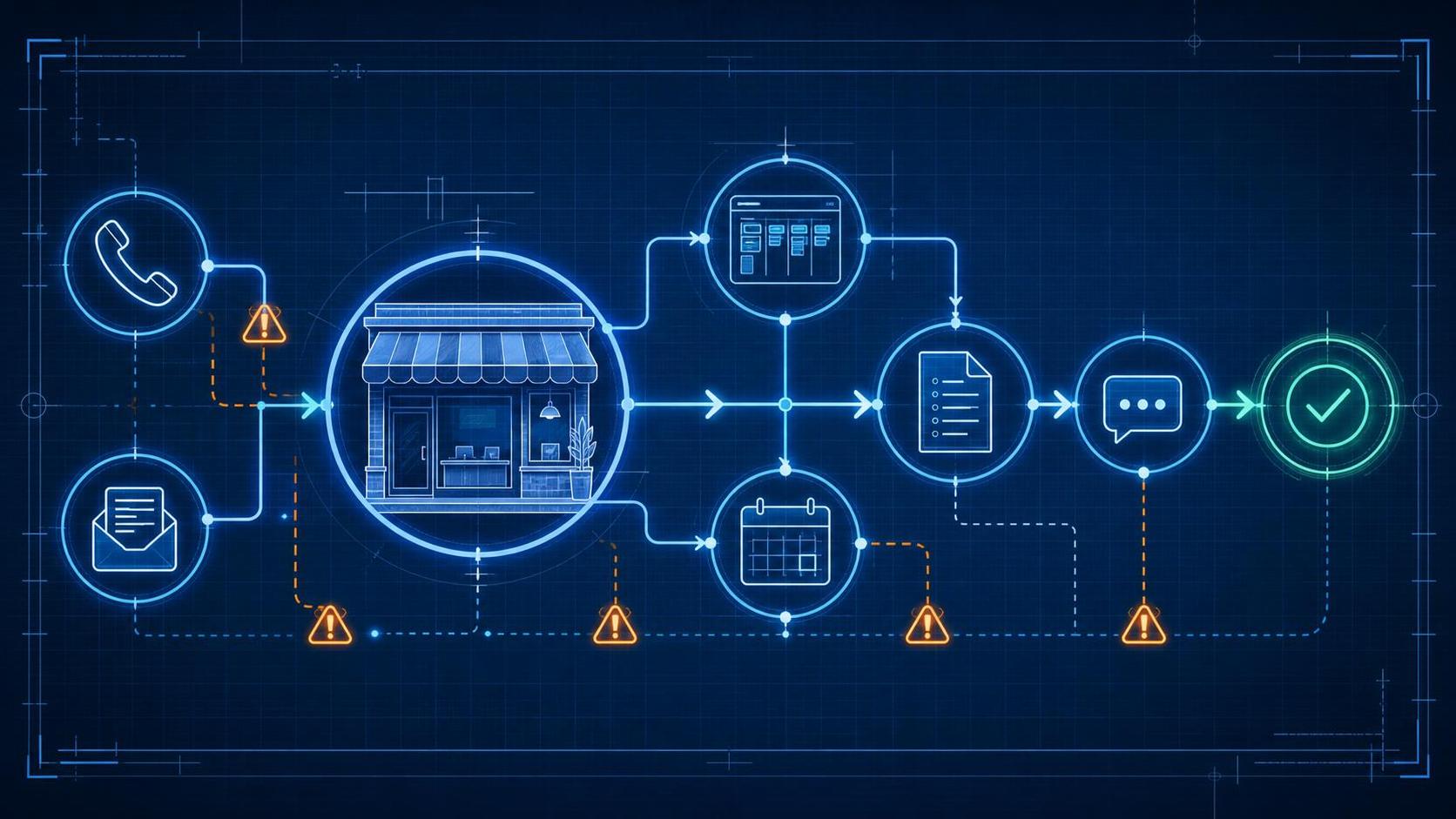
Customer journey mapping helps you see where those leaks are happening. It does not need to be complicated. For most local businesses, the goal is simple: understand the path a prospect takes from first inquiry to booked appointment or sale, then fix the points where people are dropping off.
Introduction to Customer Journey Mapping
Customer journey mapping is the process of documenting each step a potential customer takes with your business, from the moment they first become aware of you through inquiry, follow-up, scheduling, quoting, purchase, service delivery, and repeat business.
For a local business, this may include phone calls, website forms, emails, text messages, online booking, walk-ins, referrals, estimates, reminders, and post-service follow-up.
The purpose is not to create a perfect diagram. The purpose is to make your sales and service process visible enough that you can answer practical questions:
- Where do new leads come from?
- How quickly do we respond?
- Who owns the next step?
- Where do prospects wait too long?
- Which leads never receive follow-up?
- Which quotes go cold?
- Which opportunities are stuck in the pipeline?
When you map the journey, you turn assumptions into a clear view of what is actually happening between inquiry and conversion.
The Customer Journey Problem
Local small and medium businesses often lose revenue because prospects drop out at invisible points in the customer journey.
The business may be getting calls, form submissions, referrals, and repeat inquiries, but not all of those opportunities become booked appointments or customers. Owners may feel the problem is lead quality, advertising, pricing, or competition. Those factors can matter, but they are not always the first place to look.
Common revenue leaks include:
- Unanswered calls during busy hours
- Slow follow-up after a new inquiry
- Website forms that are not tracked consistently
- No clear process for after-hours leads
- Manual scheduling delays
- Quotes sent with no structured follow-up
- Unclear next steps for the customer
- Leads sitting in a CRM with no owner
- Old leads never being reactivated
These leaks often happen because the business has grown faster than its process. What once worked with a small number of leads becomes inconsistent when more staff, more channels, and more customer expectations are involved.
Why Customer Journey Gaps Happen
Most local businesses did not build their customer journey intentionally. It formed over time.
One employee answers calls. Another handles scheduling. Someone else sends quotes. A manager follows up when they remember. Website inquiries may go to an inbox. Text messages may live on one person’s phone. Notes may be stored in a CRM, spreadsheet, email thread, or nowhere at all.
This creates gaps in the lead-to-sale process.
A simple local business customer journey often looks like this:
- Customer has a need.
- Customer finds the business through search, ads, referrals, social media, or prior experience.
- Customer calls, submits a form, emails, chats, or walks in.
- Business responds and asks qualifying questions.
- Customer books an appointment or requests a quote.
- Business confirms details and provides next steps.
- Customer receives service, a proposal, or pricing.
- Business follows up.
- Customer decides to buy, delay, choose someone else, or stop responding.
- Customer may return, leave a review, or refer others.
The issue is not that this journey is complex. The issue is that each step needs ownership, timing, and tracking. Without those, leads can fall through the cracks even when the team is working hard.
Business Impact on the Sales Pipeline
Customer journey mapping matters because conversion problems are often operational, not just marketing-related.
If you are paying to generate leads but losing them during response, scheduling, quoting, or follow-up, more advertising may simply send more prospects into the same leaky process.
The business impact can show up as:
- Healthy lead volume but inconsistent booked appointments
- Good conversations that never turn into quotes
- Quotes sent but few approvals
- Staff unsure which leads need follow-up
- Prospects choosing competitors who respond faster
- Managers lacking visibility into stuck opportunities
The goal is not perfect analytics. The goal is enough visibility to understand where the pipeline slows down and which fixes will make the greatest difference.
A useful customer journey map usually includes:
| Journey Element | What to Document |
|---|---|
| Lead source | Where the inquiry came from |
| Customer action | What the prospect did next |
| Business response | How the team responded |
| Owner | Person or system responsible |
| Timing | Expected response or follow-up window |
| Next step | What should happen next |
| Outcome | Booked, quoted, won, lost, or pending |
Once this is documented, your journey stages can become your sales pipeline stages, such as new inquiry, contacted, qualified, appointment booked, quote sent, follow-up due, won, lost, and reactivation opportunity.
Customer Psychology
Customers usually do not think in terms of your internal process. They think in terms of confidence, convenience, and clarity.
When someone contacts a local business, they are often trying to solve a specific problem. They want to know:
- Did the business receive my request?
- Can they help me?
- What happens next?
- How soon can I get scheduled?
- What will it cost?
- Can I trust them to follow through?
Every delay or unclear handoff creates doubt. That does not mean the customer is upset. It may simply mean they keep looking, contact another provider, or forget to respond.
Strong customer journey mapping helps you identify where trust is being built or weakened. Fast acknowledgment, clear next steps, appointment reminders, organized quote follow-up, and consistent communication all reduce uncertainty.
For many local businesses, improving the customer experience does not require a major technology project. It starts with making sure interested prospects are not left waiting, wondering, or repeating themselves.
Customer Journey Mapping Example
Consider a local service business that receives inquiries from phone calls, website forms, referrals, and email.
The owner believes the main issue is not enough leads. After reviewing the last 30 inquiries, the team finds a different pattern:
- Several calls were missed during lunch breaks or while staff were helping existing customers.
- Website forms were sometimes answered the same day and sometimes the next morning.
- Quotes were sent manually, but no one had a consistent reminder to follow up.
- Appointment confirmations depended on whoever handled the booking.
- The CRM contained leads, but pipeline stages were not updated reliably.
After mapping the customer journey, the business identifies three leaks closest to revenue: missed calls, delayed form follow-up, and quote follow-up.
The first improvements are simple. Missed calls receive a text-back message. New web inquiries are assigned to one shared lead inbox. Quotes create follow-up tasks automatically. Appointment reminders are sent consistently. Managers can now see which leads are waiting, quoted, or overdue.
The business did not need a complicated funnel. It needed a visible inquiry-to-booking and quote-to-sale process.
Common Customer Journey Mapping Mistakes
Customer journey mapping is most useful when it stays practical. Avoid these common mistakes:
- Mapping too much at once. Start with one customer type or one service line.
- Focusing only on marketing. The journey continues after the lead arrives.
- Ignoring response time. Speed-to-lead is often one of the easiest gaps to find.
- Tracking leads without next steps. A CRM is only useful if it shows who needs action.
- Automating before clarifying the process. Automation can make confusion happen faster.
The best maps are not the most detailed. They are the ones your team will actually use to improve daily follow-up, scheduling, quoting, and conversion.
Customer Journey Mapping Solutions
Better Processes
Start by mapping one common customer journey from first inquiry to sale.
Use this simple framework:
- Choose one customer type or service.
- List every touchpoint from inquiry to decision.
- Identify what the customer wants at each step.
- Write down what your business does next.
- Mark delays, confusion, or missing ownership.
- Choose the top three leaks to fix first.
Prioritize leaks closest to revenue. A slow quote follow-up process may deserve attention before a new marketing campaign. A missed call from a high-intent prospect may matter more than a low-engagement email subscriber.
Better Systems
Once the process is clear, support it with simple systems.
For many local businesses, this can include:
- A shared inbox or lead dashboard for all new inquiries
- CRM stages that match the real sales journey
- Follow-up tasks for quotes and open opportunities
- Appointment confirmations and reminders
- Templates for common email or SMS responses
The system should make it obvious which leads are new, which have been contacted, which are waiting on the customer, which need follow-up, and which are won or lost.
You do not need perfect reporting to start. Compare your current performance against your own baseline: response times, booking rates, quote follow-up completion, close rates, and no-shows. Your first benchmark is your previous process.
Automation
Automation works best for repetitive steps that should happen consistently.
Useful examples include:
- Missed-call text-back messages
- Instant confirmation after a form submission
- Appointment reminder messages
- Quote follow-up task creation
- Re-engagement messages for old leads
Automation should not replace good judgment. It should reduce the chance that important steps are forgotten.
AI
AI employees and AI-assisted workflows can help when lead volume, after-hours inquiries, or follow-up demands exceed what your team can consistently handle.
AI can support the mapped journey by helping to:
- Respond to missed calls or after-hours inquiries
- Capture and summarize lead details
- Update CRM records
- Send reminders or follow-up prompts
- Keep prospects from going cold between human touchpoints
AI is most useful when the business already knows what should happen next. If the journey is unclear, AI may simply repeat the same confusion at a larger scale.
Small improvements can compound across monthly lead volume. Better booking, faster response, and more consistent quote follow-up all increase the value of the leads you already have.
AI Opportunity
AI should be viewed as a support layer, not a replacement for a mapped customer journey.
When your stages are clear, AI can help move leads through the process faster and more consistently. For example, an AI employee may answer a basic after-hours inquiry, gather contact details, notify the team, and create a CRM record before the office opens.
That kind of support can be valuable because many local business leads are time-sensitive. If a prospect has a real need and your business does not respond, they may contact someone else.
Quick Wins
If you want to start improving conversion this week, do not begin with a large software project. Begin with a short review of recent inquiries.
Look at the last 20 to 50 leads and ask:
- How many received a timely first response?
- How many were successfully contacted?
- How many booked an appointment?
- How many received a quote?
- How many quotes received follow-up?
- How many leads have no recorded outcome?
Then choose one fix that removes friction from the next step. This might be a missed-call text-back, a quote follow-up checklist, CRM reminders, or a clearer scheduling workflow.
The fastest gains often come from making sure high-intent prospects receive a prompt response and a clear path forward.
Book a Free Revenue Recovery Consultation
Frequently Asked Questions
What is customer journey mapping for a local business?
Customer journey mapping is the process of documenting how a prospect moves from first contact to booked appointment, quote, purchase, service, and repeat business. It helps you see where leads are moving forward and where they are dropping off.
Is customer journey mapping the same as sales process mapping?
They are closely related. Customer journey mapping looks at the experience from the customer’s perspective. Sales process mapping looks at the internal steps your team follows. For local businesses, the two should connect.
Where do most local businesses lose leads?
Common drop-off points include missed calls, slow callbacks, untracked web forms, weak quote follow-up, scheduling delays, unclear next steps, and poor CRM tracking.
Do I need a CRM to map the customer journey?
No. You can start with a spreadsheet, whiteboard, or simple list. A CRM becomes more helpful once you know your stages, owners, and follow-up requirements.
Should I automate my follow-up process?
Yes, but only after the process is clear. Automating a confusing journey can create more confusion. Start by defining the right next step, then automate repetitive tasks such as reminders, confirmations, and follow-up prompts.
How does this help improve conversion rates?
It helps you see which prospects are not moving to the next stage and why. Fixing response time, scheduling, quote follow-up, and pipeline visibility can help more existing leads become customers.
Key Takeaways
- Many local businesses lose revenue through small, hidden customer journey gaps.
- Customer journey mapping makes the inquiry-to-sale process visible.
- The most common leaks happen around missed calls, slow response, scheduling, quoting, and follow-up.
- Simple CRM workflows and reminders can improve pipeline visibility.
- Automation and AI are most effective when they support a clear process.
- Fixing conversion leaks can make future lead generation more profitable.
Next Steps
Start by mapping one customer journey from first inquiry to booked appointment or sale. Keep it simple. Identify each touchpoint, who owns it, what should happen next, and where prospects currently stall.
Then choose the three highest-value leaks to fix first. In most local businesses, those are usually response time, scheduling friction, and quote follow-up.
For a broader revenue recovery framework, review CV-0001 and connect your customer journey map to your lead recovery and conversion improvement process.
Book a Free Revenue Recovery Consultation
If you want help identifying where revenue is leaking from your business, book a free consultation.